Tasks
Hand work to an agent that ends in a pull request: queued tasks, sign-off and merge, stacked cards, and plans split into pieces.
Paste into your coding agent to have it set this up
On this page
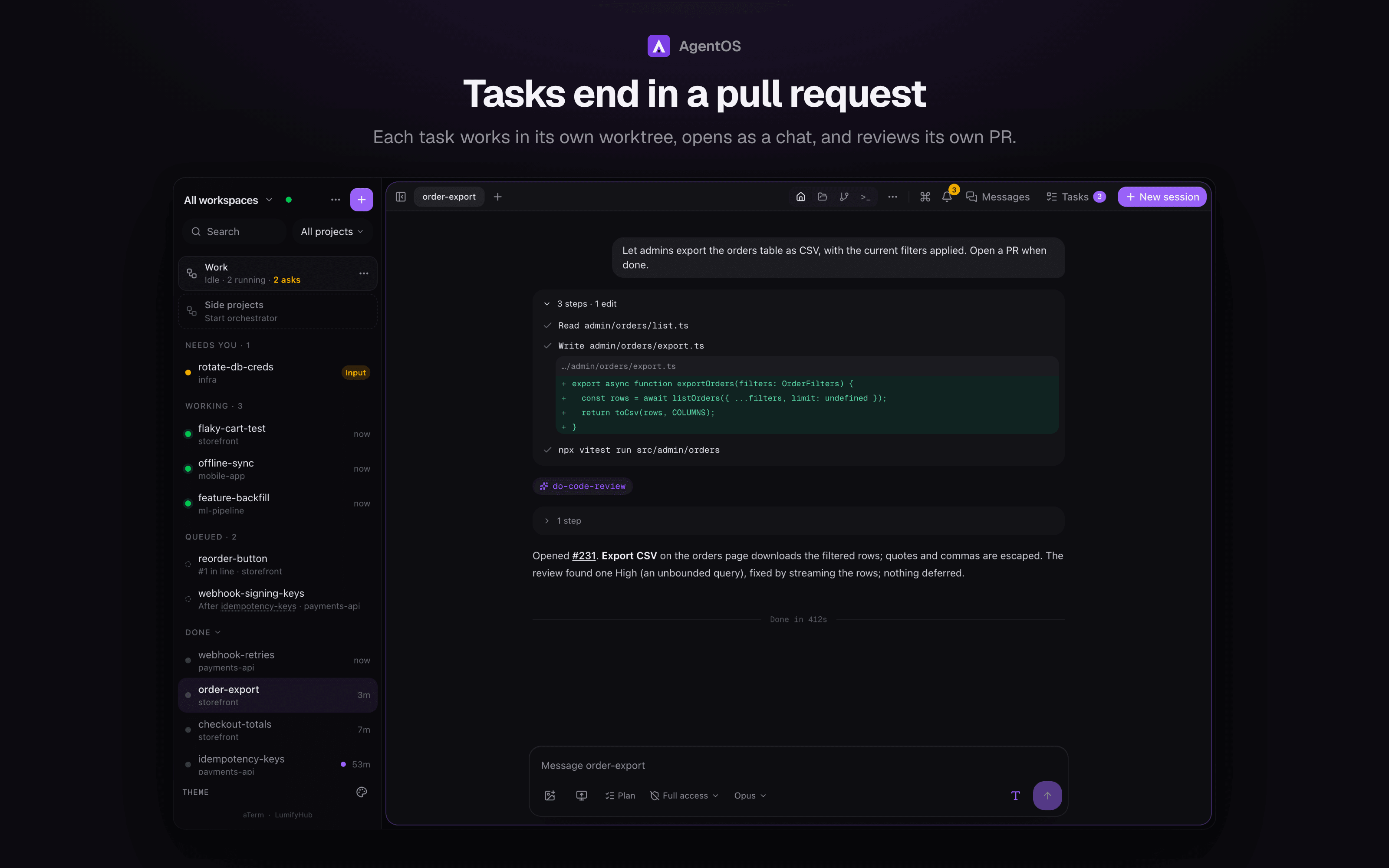
A task gets its own git worktree, branch and ports, opens as a chat, runs
the project's code review before it opens its PR, and waits for your
sign-off. A workspace's running task limit (Settings → Workspaces) caps how many run at once; the rest
wait under Queued with their place in line and start on their own, and
aos task --after holds one until another finishes.
A task's chat: the edit, the tests, the code review and the PR it opened
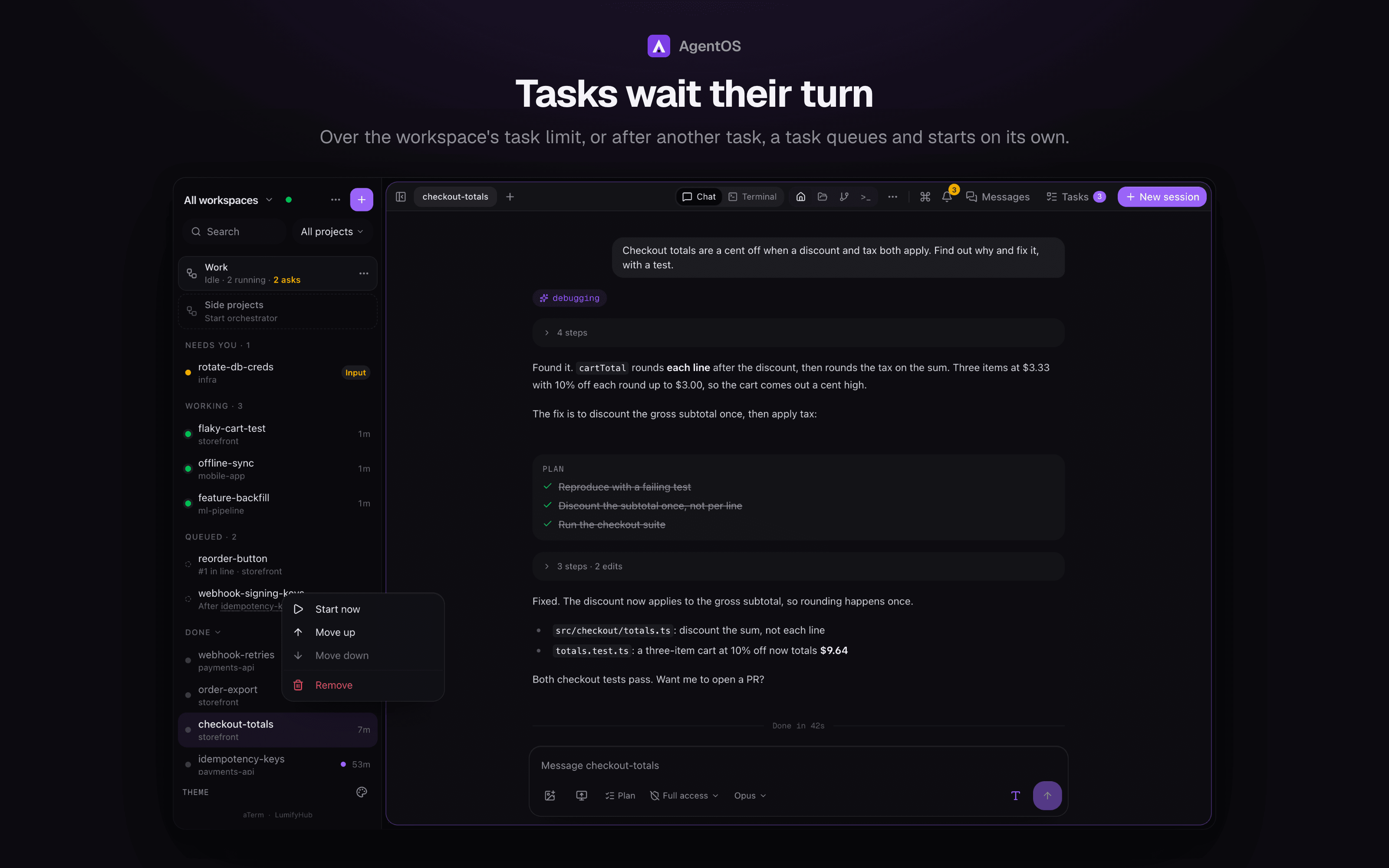
Two queued tasks in the sidebar, one in line and one waiting on another task, with its menu open
Hand off work and keep going. A task is a draft with Open a PR when
done turned on (New task in ⌘K, the sidebar's New menu or the Tasks
panel opens one). AgentOS creates a git worktree and branch, starts Claude there in tmux
with a brief to finish by pushing and opening a pull request, and tracks it:
Working, Needs input, Blocked, Ready for review, Checks failing or Agent
exited. Sign off & merge merges the PR (refused while CI is failing
or pending), then removes the session, worktree and branches. Drop closes
the PR and removes everything. Agents never merge their own work.
Merging settings. How a PR merges (sign-off, Done, Land and the
orchestrator's external PRs alike) and what's cleaned up after it are set in
Settings → Merging (or ⌘K → Merge settings) for every project,
and overridden per project in its Project Settings → Merging or in its
agentos.json:
{
  "merge": {
    "method": "rebase",
    "delete_remote_branch": true,
    "delete_worktree": false
  }
}
method is squash (the default), merge (a merge commit) or rebase.
GitHub enforces the repository's allowed methods: if it refuses the one set,
the merge fails with a message naming the method and the repository setting
to turn on (Settings → General → Pull Requests), and AgentOS never falls back
to another method. The project's settings show a method its repository has
turned off. delete_remote_branch and delete_worktree (both on by default)
delete the branch on origin and the local worktree with its branch after a
merge. With either on, main, master and HEAD are never deleted, nor a
branch a stacked task still targets, nor a worktree holding uncommitted work
or commits the merge didn't include. The most specific setting wins: the
project's, then agentos.json, then the global one.
Queued tasks. A workspace can limit how many tasks run at once (none by
default; set it in Settings → Workspaces, or PATCH /api/workspaces/<id> with {"maxRunningTasks": 3}, or
null for no limit). A task started over the limit is queued, with no
worktree or agent yet, and starts by itself in line order when one finishes
(merged, dropped or done). aos task --after <task|any> (and the
orchestrator's start_task with after) holds a task until a named task
finishes, or until any task still working now does (a running task whose PR
was closed or merged doesn't count; with none, it starts at once). The
orchestrator's drop removes a queued task by its id. Pause stops automatic starts,
and the orchestrator's brakes still apply when its queued tasks start. A task runs on Claude Code unless
POST /api/tasks names another agent ("copilot"): that one runs as a chat on
this machine, with no plan-first step or role models, and is never picked for
you. The
line is kept in the database across restarts (GET /api/tasks/queue; start
now, move up or down, or remove with /api/tasks/queue/<id>). The sidebar
shows them under Queued with their place in line or what they wait on,
and the same actions in each row's menu; a row becomes the task's own row
when it starts. Why it works
this way: docs/decisions/2026-10-10-queued-tasks.md.
Which queued task starts next. The line is ranked by a score, not only
by arrival: the task's priority (urgent, blocking, normal,
background; set in the start form, with aos task --priority, by the
orchestrator's start_task/set_priority, or from a queued row's menu), plus
a little for every minute it has waited (capped, so nothing starves), plus a
bonus for a paused task that is due to resume. Ties go to the earlier one. A
row says why it waits: #2 of 5 · Urgent, Waiting: this machine load red,
Waiting: after any running task (…). aos queue lists the line.
Every reason a task waits is a hold, listed in one fixed order: after,
after any, the orchestrator's Pause, the usage window, needs (a Mac), load
red, load amber, simulator, start spacing, and last the slot limit. The row
shows the first that applies; a task with none starts. A paused task due to
resume, and a first-task's hand-off back to this machine, ask the same
checks, so they say the same words. Most clear by themselves; a Pause and a
missing Mac don't. The code is lib/tasks/holds.ts (the list and the
texts) and lib/tasks/hold-checks.ts (the ones that read the database); the
queue itself is split into queue-rows, queue-view, queue-candidates,
queue-placement, queue-start and queue-tick. Why:
docs/decisions/2026-10-15-one-hold-model.md.
- Machine load. The load monitor feeds a start gate: starts are held while
the machine is red and allowed again only after it has stayed out of red for
two minutes. On amber onlyblockingandurgentwork starts. At most one
automatic start a minute per machine, and a task that boots a simulator
waits for the previous one to finish booting and for a free simulator
(AGENTOS_SIMULATOR_MAX, default 2). - Where it runs. What a task needs (
mac,xcode,simulator) comes from
the task (--on-mac, themachinefield), amachine: macor
needs: simulatorline in the brief,machine.needsinagentos.json, or
the repo (an Xcode project, an Expoiossection, asimulatorblock).
When this machine is red or can't meet the needs, a queued task starts on a
linked machine that is green, has the project and meets them, and its row
saysStarted on <machine> · this machine load red. Each machine reports
its load atGET /api/load; the queue asks linked machines every 15 s while
work is waiting, and a reading older than a minute counts as red. Work that
needs a Mac never leaves it, and a task already running is never moved.
Pinned and non-Claude tasks stay on this machine and wait; the hold says
why. - Plan-first tasks. A plan-only or plan-first task may plan on a linked
machine that has room, since planning only reads code. That machine plans
and stops; this one copies the plan toplans/remote/<id>.md(the path the
orchestrator reads), announces it once, and decides what follows: approval
goes to the machine that planned it, unless the task needs a Mac this
machine has and that one lacks, or its plan is in pieces (they register
here). Those move here with the ordinary task move once this machine is free,
then implement. No extra model runs; a linked machine needs the
remote-plancapability (an older version keeps the task here). - After any.
after: "any"consumes one finish: three waiters and one
finish start one of them. - Usage window. Only while the orchestrator's brakes are on.
Pause for a time. A running task or chat can be paused from its row menu
(or POST /api/sessions/<id>/pause, the orchestrator's pause_task): for 1
hour, 2 hours, until tomorrow 9 AM, or until resumed. By default the agent
finishes its current step, then ends; Pause now interrupts the step (after
a push or merge in flight). The worktree and conversation stay, nothing is
frozen, and the task gives its slot to the next queued one. The row moves to
the Snoozed shelf as Paused · resumes 9 AM. Anything that would have woken
it (CI and review notes, the orchestrator's and other sessions' messages)
waits and is delivered together, in one continue prompt, when it resumes. A
resume (the timer, Resume now, resume_task) needs a slot again and goes
ahead of new arrivals of the same priority; Resume now from a person skips
the limit. A person's pause is only lifted by a person; the orchestrator can
lift its own. Not pausable: a task that is merging, moving, setting up, an
orchestrator or quick change, or one waiting on you (an ask, a question, a
plan to approve). An armed paused task still merges when its gates pass, and
a paused task can't be moved. Decision record:
docs/decisions/2026-10-14-task-scheduling.md.
A paired device's token can run the building loop through read-only routes:
GET /api/start-options?projectId= (agents and models, the models a task can
run on, machines, branches, whether a task plans first, in one request),
GET /api/tasks/<id>/diff (the task's whole change, base to head: a file list,
then ?file=<path> for one file's patch; capped, with truncated when a cap
is hit; read from the worktree, else the PR), and GET /api/tasks/<id>/checks
(the PR head's checks, the tail of a failing job's log, and the review gate's
verdict). A task's plan in GET /api/tasks carries status (writing,
ready or approved), a title and capped text. Their shapes are in
lib/tasks/loop-types.ts, which has no server imports so a client can share it.
Messages to a queued task#
A queued task takes messages (the orchestrator's send, aos send, the web
and the API), by id or name. They're held with it and the reply says so. When
it starts, they follow its brief in the first prompt under "Messages while
queued", in order, so a plan-only or planned task sees them in the planning
step. scope_change on a queued task records the change on its brief at
once. Removing it from the queue discards its held messages. The queue view,
aos queue and the orchestrator's queue summary show how many are held.
Linked machines#
A task can run on a linked machine. That machine's AgentOS schedules and runs
it; this machine keeps a mirror row (same id) so the sidebar lists it, and
drives it through that machine's task API. Every call goes through one client
(lib/tasks/contract/client.ts), the lifecycle being:
| Step | Call | Who may call it there |
|---|---|---|
| start | POST /api/tasks (keyed, safe to retry) |
any paired device |
| view | GET /api/tasks (state, moved, capabilities) |
any paired device |
| plan | GET /api/tasks/:id/plan, POST …/approve-plan |
the device that placed the plan |
| message, read | POST …/message, GET …/chat-tail, …/chat-facts |
the holder |
| pause, resume | POST …/stop, POST …/resume |
the holder |
| finish | POST …/done (no merge), …/merge (pinned to a commit), …/drop |
the holder |
| move | POST /api/tasks/import, …/:id/export, …/:id/moved |
the holder |
The holder is the device whose orchestrator started or moved the task
there. A task nobody holds (one started there by a person) is open to any
paired device, and this machine's own web UI sends no device, so mirror rows
and tasks running here are never refused. A device that is not the holder gets
a 403 with the same message from every route.
One loop (syncMirrors, on the queue tick) reads each machine's list once and
records what it says: finished or moved, a plan written there (copied to
plans/remote/<id>.md), the plan note, and an approved plan on its way home.
Opening the task list only reads. A machine that can't be reached leaves its
mirrors as they were and shows the error on their rows.
Stacks#
A project whose board is linked to LumifyHub can run the whole board as
stacked tasks: Tasks → From the board → Run as stack shows the plan
first, then starts it. A card starts as soon as every card it's blocked by has
a PR open (not merged), on top of the card it depends on most: its branch is
cut from that card's pushed branch, and its PR targets it, so each PR shows
only its own commits. At most three run at once without a PR (adjustable).
Merging goes bottom-up. Signing off a card whose parent hasn't merged is
refused; after a parent merges, every card stacked on it (grandchildren
included) is rebased and its PR retargeted, and its agent is told. This works
with every merge method: only the child's own commits are replayed onto the
default branch, whether the parent was squashed, rebased or merged with a
merge commit. Land
merges every PR in order after checking all of them are open and green, and
waits for each restacked PR's checks before merging it. A chat card's agent
is stopped between turns before anything merges (Land waits up to 5 minutes
for a running turn, and refuses, naming the card, if it doesn't end), and
what it's sent during the land waits in its queue. A conflict stops on
that card with the exact command to fix it.
Plans in pieces#
A plan ends with a ## Pieces block, one piece by default. AgentOS accepts
more only for one of four reasons, written on the piece: (a) it spans
repositories, (b) one part must be live (merged and deployed) before the
other can merge, (c) one part needs you mid-way, (d) one part must be
revertible on its own (a migration that rewrites rows, or an auth change
mixed with other work). Diff size is never a reason. A piece without a
standing reason is folded into the one before it, and a repository with no
deploy check can't claim (b); this is a deterministic check, not the model's
word.
A one-piece plan behaves as always. With several, the first piece that is in
the planning task's own project (and waits on nothing) continues in that task
with only its slice. A piece in another project of the workspace is never built
by the planning task: it starts as its own task there, with its own worktree,
so its PR is tracked and gated; a plan with no piece of the planning task's
own ends that task once the pieces are registered. The rest wait as rows (no worktree,
port or queue slot) until what they wait on has merged or deployed, then start
as tasks through the usual brakes and queue. A plan waiting for approval
shows its pieces: Merge into ① or Drop a piece (undoable until you
approve), Approve with note…, or Reject. Each piece's review judges
its slice; the last also checks the whole plan was built. Tasks shows
the feature's pieces and what each waits on, with Release anyway for one
held by a dropped or failed predecessor. A plan-only task that reaches
approval sends a "Plan ready: name, N pieces" push, and a finished feature
sends one "Feature merged" push naming it.
A piece's repo can be written as the project name, the repository's folder
name or its GitHub owner/name, in any case; one that fits two projects is
refused. A merged PR counts only for a piece in its own repository. When the
planning task merges, the pieces it built in that repository (its own piece, or
else those still waiting there) are marked merged with its PR and don't start.
A waiting piece whose repository already holds a merged PR of the feature that
no piece accounts for is held, with Release anyway to start it.
Nothing about a plan's pieces is silent. A Pieces block that can't be read, a
count that differs from the items it lists, or a (repo: …) that is no project
of the workspace holds the task for approval and tells the orchestrator ("couldn't
register its pieces"), instead of building on a guess. A plan that builds as
fewer pieces than it listed (a piece with no standing reason is folded) says
so, tells the agent to build the folded work, and the "Feature merged" line
names what was folded. A background sweep tells the orchestrator once about a
piece still waiting 30 minutes after its dependency merged, a task whose turn
ended with no PR, and a PR an agent opened outside its task's repository (read
from its gh pr create call), which no task owns and no gate covers.
A task of a plan that starts another task in a project where the plan has pieces
waiting must say which piece the new task builds (aos task --piece <name>, or
piece on the orchestrator's start_task); without it the start is refused
with the waiting pieces listed. The piece is claimed for that task, follows it
(merged when it merges) and is never started a second time. Pieces whose
dependency isn't met yet can be claimed too; only waiting pieces can.
Who started a task#
Every start records who: started_by (the session that started it, empty for a
person), parent_session_id (the session it came from; a plan's pieces point
at the planning task) and started_via (session, orchestrator, person, plan,
schedule, recipe, stack or remote). aos task and aos spawn run from inside
a session record that session, found by its id or, without one, by the
worktree the command runs in. Every plan approval, a plain Approve included,
is written to the task's brief, so its review judges the PR as the
implementation of the plan.
Analyst loop#
Press Loop on a task to have an analyst check the coding agent's work after every turn. Set the acceptance criteria (drafted from the task's checklist when it has one) and the limits, and start. Each cycle shows the checks that ran, what the analyst found, and the instruction it sent. The next instruction waits a few seconds so you can edit it, send it now, hold it or skip it. The loop stops when every criterion is met, when it is blocked, stuck or out of cycles, cost or time, or when you stop it. It never merges or publishes: that stays with you.
Worktree clean-up by age#
A server job runs every 6 hours on each machine and removes the worktree of a
session that settled (merged, dropped, done or archived) more than N days ago:
N is 7 by default, set in Settings > Merging, overridden per project in Project
Settings, and 0 turns it off. It leaves a session that is running, waiting for
you, has an open PR or a terminal open in its folder, and anything with
uncommitted changes or commits that no remote branch, merged PR or upstream
patch holds, each logged with its reason. Folders in the worktrees folder that
no session owns are removed the same way. The branch and the conversation stay:
restoring a swept session recreates the worktree from its branch, or says its
worktree was cleaned up and brings back the conversation alone. Health >
Clean-up lists every run (removed, space freed, skipped and why), and Dry
run shows what the next one would remove. Only production servers run it
(AGENTOS_WORKTREE_SWEEP=1 turns it on elsewhere, 0 off).
The full clean-up (test leftovers, stale task databases, spares, temp folders and
build caches) is off until you turn it on, and only lists what it would remove.
Read a dry run, then use Health > Clean-up > Turn on, aos sweep --arm in your
own terminal, or tell the orchestrator: its sweep_arm tool turns it on or off
for this machine or a linked one, refuses unless that machine has a dry run from
the last hour, and logs it in the decision log with the run's totals. Task and
other sessions can't turn it on.